
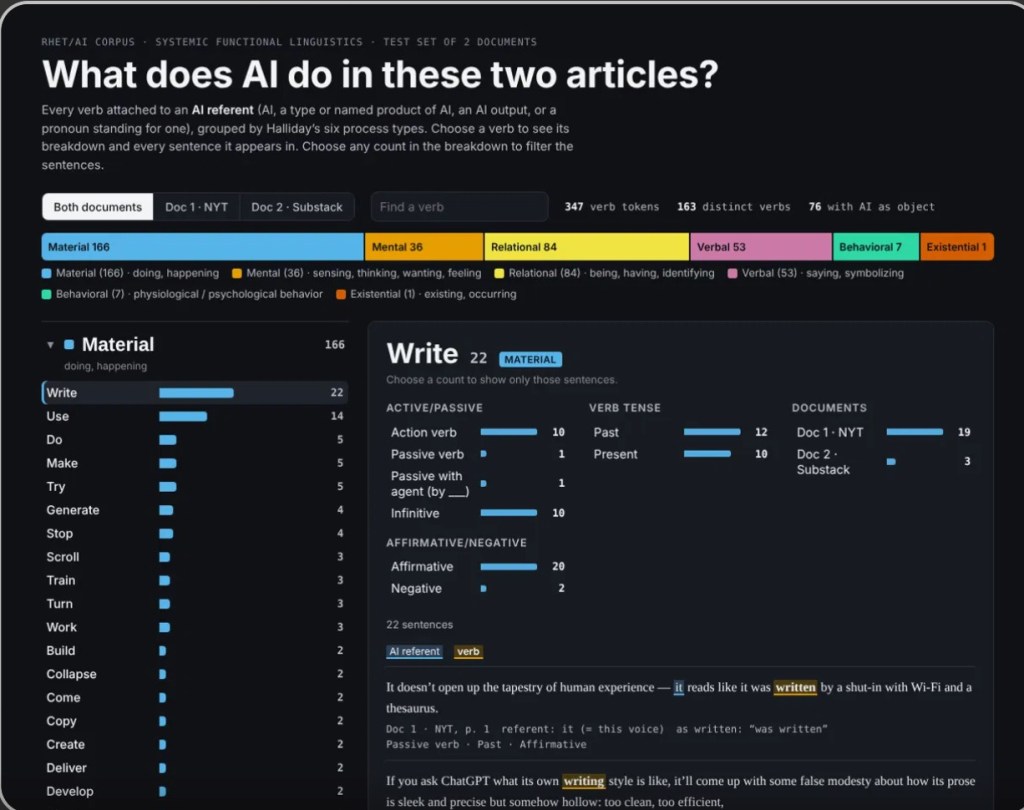
Figure 1: Screenshot of the current Claude AI Verb draft interface. 8 Oct 2026.
This short blog post provides a brief follow-up on one or two ongoing “experimental” projects involving AI, file organization, and corpus analysis. Though AI has negatively impacted my life and the institutions I have devoted it to in more ways than I can start to describe, I do not have the privilege of avoiding it. As always, I am certainly not advocating AI usage for anyone who can avoid it. I am accurately aware that there are epistemic limitations of AI that exacerbate anti-intellectualism and the previous, ongoing epistemological crises in modern global culture. That being said, I wish to briefly follow-up on an essay I wrote on Substack, “8 ‘Everyday AI Uses’ in Academia from An AI Cynic,” in which I provided a demonstration of how I used Claude to organize a particularly cluttered Google Docs folder by laying out steps for further organization using a combination of automated tools and individual, “manual” human input.
Output: News AI Verb Exploration
For at least 2 years, I’ve been stuffing various PDF files on AI and writing into an “archive” folder with a tentative idea of a writing course or two that I doubt I will ever be able to teach in this particular academic climate. Under these global and personal circumstances, it is hard to be motivated to sort through hundreds of PDF documents, especially on a topic I am both entangled in and sick of.
Then, on a whim, I asked Claude to organize the loose PDF files in my “motherfolder” (titled “Rhet/AI”) into 5 subfolders based on document type and/or how I planned to use the document for reading. Those 5 subfolders were:
- Peer-Reviewed Academic Writing
- News and Commentary on AI
- Primary Source Documents
- Educational Material
- Other
The short silent video below shows Claude sorting my Google Drive folders. The video is not required to understand the rest of this blog post, but I provide it to verify timestamps and display the prompt-chain that I used.
Of course, Claude’s organizational skills were far from perfect, as expected. For one thing, AI struggles to identify the necessary metadiscourse markers that characterize academic writing; it is not enough to simply perceive “peer-review” correctly or otherwise. Additionally, even putting aside the inevitable limitations of AI tools to comprehend and reproduce current and well-cited academic discourse at the cutting edge of a field, it is also an inevitable reality that writing instructors have clear course goals in mind that are not going to be obvious to anyone without deep training in pedagogy and curriculum design. I always have an idea in mind for how I would use a text in a class or curriculum design tutorial and often, I can see how the same assigned reading could be used in different ways.
For example, there are Educational Resources in the form of technical documents that also yield fruitful rhetorical analysis. When I was writing my dissertation, I read numerous technical books that merely described the algorithms I was using as a case study to explore rhetorical agency as an analytic lens. It was difficult to “turn off the rhetoric,” however, when the “dry” and “expository” technological writings often contained implicit and explicit notions of algorithmic and human agency relevant to my interests, enough to serve as rhetorical artifacts for a chapter in their own right.
By the same token, a text such as Batalis, Ji, and Venkatram’s “AI Safety Evaluations: An Explanation” fits in the “Educational” folder because it offers an accessible introduction to AI safety principles that I believe would benefit students’ understanding. At the same time, as with any text that evokes and reifies philosophically thorny concepts like “safety,” “privacy,” and “evaluative norms,” “explanatory” resources and technical documents such as white papers, instruction manuals, memos, and other tech-industry-oriented “gray media” (Fuller and Goffrey) can be potential objects of rhetorical analysis. In fact, I believe it is necessary to encourage students not to take descriptions of AI and other technologies “at face value.” Because I always have multiple reasons for assigning most texts and have traditionally not expected each text to serve each student in the same way, it is inevitable that Claude would be insufficient at organizing my material in appropriate folders. I would not have it any other way.
This simple but practical example of how and why “humans-in-the-loop” cannot be extracted from research or education – a topic I will not belabor at length here – still leaves open room for further improvement. In this short blog post, I will describe how I have used the organizational material, combining Claude Opus 5.5 with my own input and other tools, before laying out the next steps I should take to restructure the material.
Uses of Data:
The “News and Commentary Folder” has become the template for an interactive HTML webpage whose current draft can be found here. Because I am writing a long-form blog post on Substack based on this project, I will not go into detail here, except to say that I have been using my constantly updated “Folder 2 – News and Commentary on AI” folder as a case-study input document to practice prompt writing on Claude.
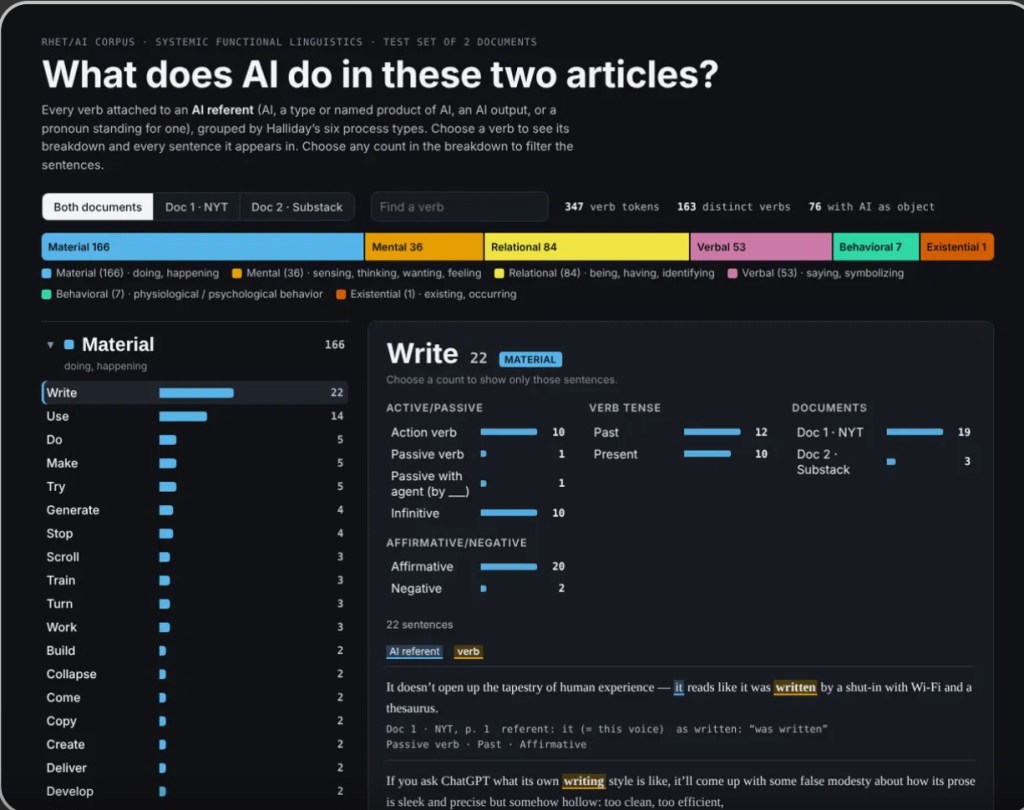
Figure 2: 8 Oct 2026 interface for AI Verb Analysis webpage
In particular, I have been practicing multi-level prompt-writing that uses AI strictly as a tool to retrieve and visualize data without making suggestions in order to explore tactics in corpus analysis that I have not been able to access since graduate school. Although Claude is not exactly an accurate tool for data extraction – a topic for another time – the practice of training Claude to perform a complex, multi-step task that can be replicated across document steps and create interactive HTML webpages can serve as a basis for later projects.
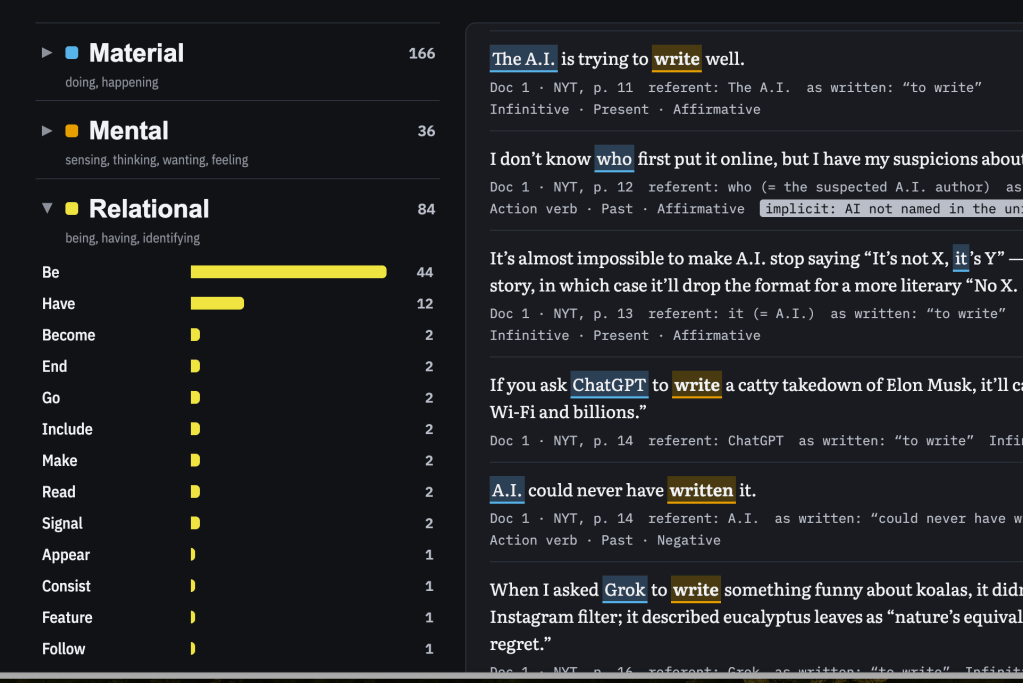
Figure 3: Oct 2026 interface for AI Verb Analysis webpage
One thing Claude Opus is good at is reformatting data. For example, one step in the chain of prompts I used to create the interactive HTML was for Claude to take the input data (the uploaded document set), extract the user-defined and user-input keywords (meticulously tweaked by myself step-by-step as needed) that the “experiment” set out to study, and then produce several output documents that included a PDF outline of the data that could be copied or downloaded in a very specific format regarding Headers and information arrangement. A shortened version of the prompt “Constraint” – in this case, an example for AI to model – that I used was:
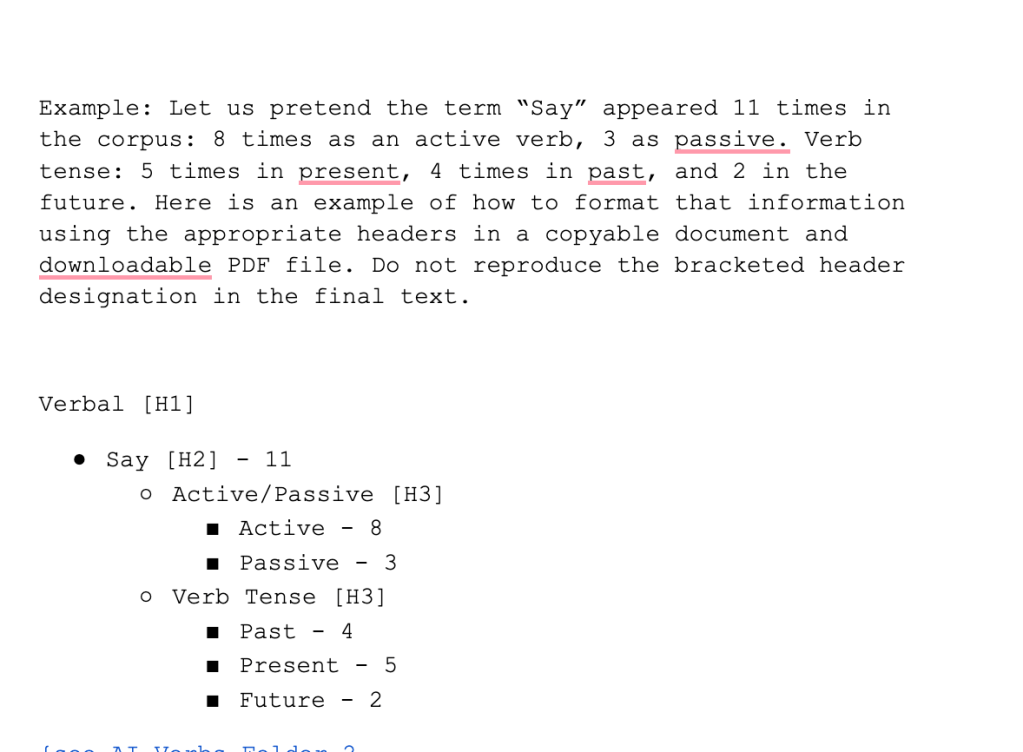
Figure 4: Screenshot of prompt-template used to provide Format example. Written by hand in Google Docs.
I had to fine-tune each of Claude’s output documents for accuracy and relevance through strategic “test-runs.” (See this document for a brief summary of the process and this 437-page document meticulously documenting the steps taken and data abstracted). Ultimately, the formatted data was easy to convert to an interactive webpage that, while still a draft, can be easily modified as I add more content and refine the categories I used to structure this open-ended project.
Next Steps in AI Analysis Project:
- Continue to Upload Files to Folder
I have always compulsively archived news articles related to “ideas” for courses I want to design, whether or not I will end up teaching them. I also remember years ago one of my students telling me that he appreciated how I archived these extra resources and suggested readings on Canvas because it helped him study and select research topics; I had perceived students benefiting from this practice, but it was nice to see that they saw that benefit! I do believe restarting my old “5 things I read this week” dispatch on Substack under “5 Things Friday” has motivated me to read and, by extension, discover and save new sources on AI.
2. Continue to refine the target of prompt-chain – “AI-Referent”
The overall task of this multi-step chain of prompts is for Claude to ultimately extract, chart, and visualize the verbs linked to what I called “AI-Referents” in the task chat. Claude is easily confused by the nuances of academic terminology that vary across disciplines. In fairness, so are many humans with PhDs. For example, in my field (Rhetoric), methodology and method are distinct concepts and are not used interchangeably. From what I gather, other disciplines do not necessarily need to draw that sharp distinction, or do so by using different terminology to describe it. As a result, I often simply “make up” terms for the purpose of a specific task. I used “AI-Referent” as a stand-in for the specific “unit of meaning” I wanted Claude to identify. However, over the course of meticulously correcting Claude through several rounds of “test runs” until Claude could at least execute the general task to my satisfaction, it is clear that this tool is not reliable for data extraction; its primary value lies in allowing me to practice my research skills (including catching Claude’s limitations and weaknesses). I am going to save this discussion for a later Substack essay, but suffice to say when you have to explain to your text-mining tool how antecedents work, it is genuinely faster to ask Claude to convert data into a spreadsheet and manually edit the data yourself before popping the new document back into Projects to convert to the format I wanted for the final Output.
3. Continue to adapt categories and fact-check verb categorization
Long story short, without going too much into Halliday’s 6 Types of Verb Processes, which I use as my organizational categories, Claude’s inability to parse nuance in academic terminology, particularly across disciplines, seems to translate into larger lapses in close reading and discourse analysis. In the case of determining whether or not the verb “To Be” is classified in Halliday’s grammatical schema as an “Existential” verb or a “Relational” verb is…genuinely pretty hard! (I get how agent deletion works, but some principles of Systematic Functional Linguistics lose me when it comes to Halliday’s specific criteria for distinguishing Existential vs. Relational from context to context. The only solution, I have realized, will be to manually go through each and every instance of “Be” in the source corpus on Claude to personally categorize that so nebulous verb.
See in the screenshots below how Claude’s “AI News Verb Explorer” draft visualized and identified different iterations of “Be” in the corpus as either “Relational” or “Existential.” I had to prompt Claude carefully and, again, will have to go over each token to determine context myself; luckily, the webpage streamlines the process by allowing me to click on a term and see it in its original context, eliminating the need to scroll through each document.
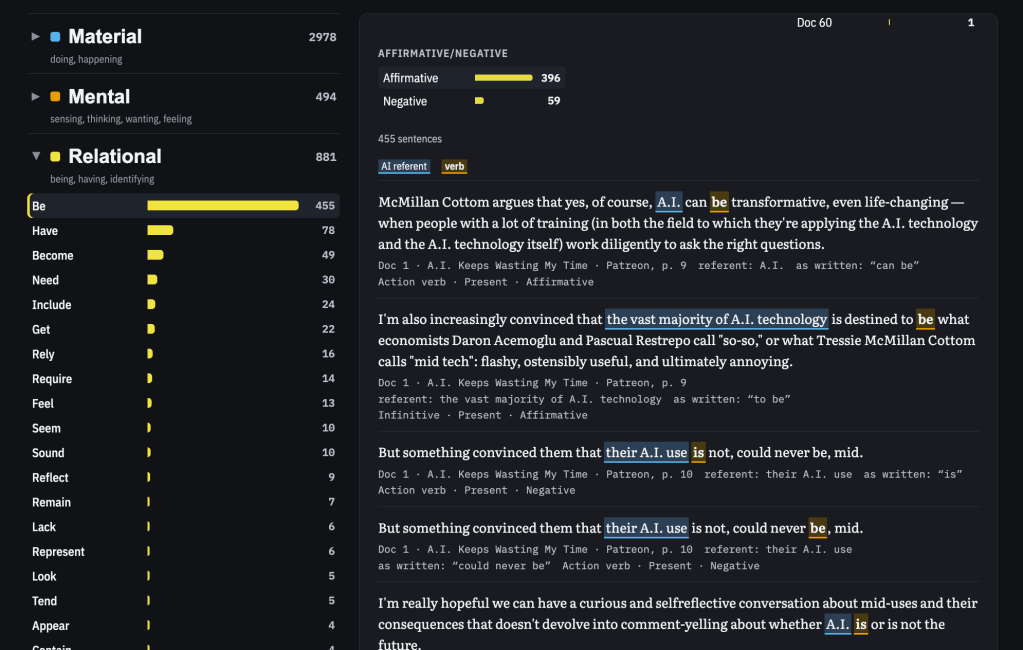
Figure 5: Screenshot of Categorization of “Be” as a “Relational” Verb. 8 Oct 2026.
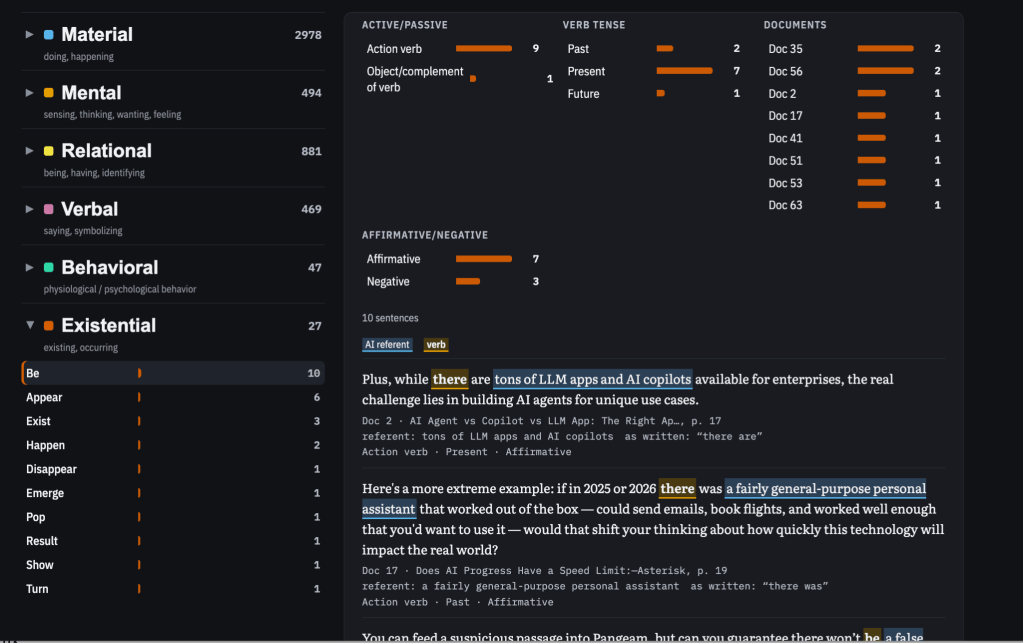
Figure 6: Screenshot of Categorization of “Be” as a “Relational” Verb. 8 Oct 2026.
I doubt that I would have noticed that “Be” was oddly underrepresented as a Existential verb had I not also requested a bar graph chart to visualize key term frequency as a poster:
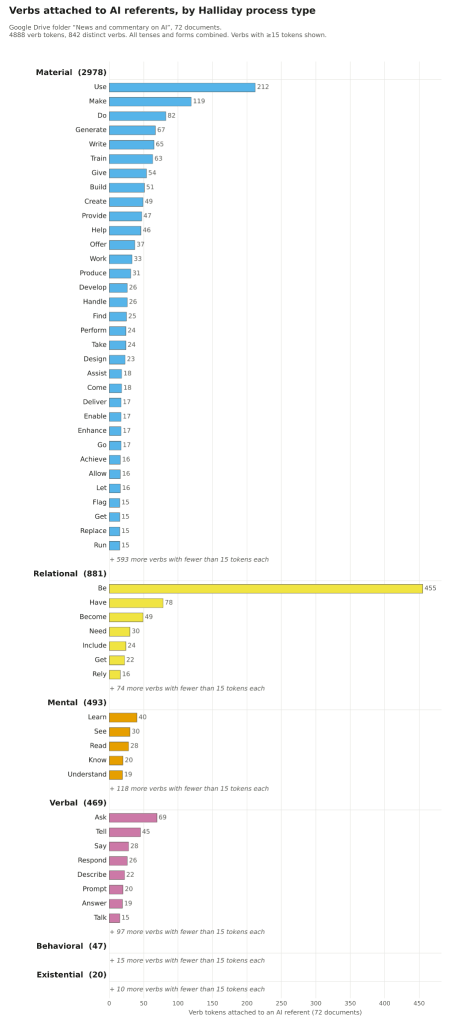
Figure 7:
That there were only 20 verbs classified as “Existential” felt wrong to me. After I began to prompt Claude to be more precise, eventually beginning to go example by example before I realized I did not have time or energy for that intensive labor at the moment, Claude was eventually able to modify the data in a “re-check.”
Even so, as of drafting, there are still only 27 Existential verbs; this strikes me as low. I have yet to see whether or not this is due to my limited sample size, or if Claude’s identification skills are to blame.
So, that is where I am with the news commentary sources. What about the other folders?
Organization Hell
My next step with the other folders will be to manually organize. I am going to go folder by folder because the actual end task is not difficult; it is mustering up motivation
- Peer-Review Academic Resources – Sort by Content
To go back to how different assigned texts serve different purposes, I need to further divide my Peer-Reviewed Academic source folder to distinguish between:
- “Canonical” texts in Rhetorical Theory
- Digital Rhetoric Texts
- AI Scholarship Outside of Rhetoric (Digital Humanities)
- Other Humanities and Social Sciences as Needed
Of course, again, distinguishing a file’s location based on a hypothetical usage is not straightforward. Does Carolyn Miller’s “What Automation Teaches Us About Agency” go in Canonical Texts (perhaps in an “Agency” subheading) or does that go under a historical section for technology scholarship? In fact, what would the subheadings for an “outline” of this folder even be? To go back to formatting data, if I were to divide the “Peer-Reviewed Academic” Folder into subfolders by discipline, then I would also probably have to further divide by topic.
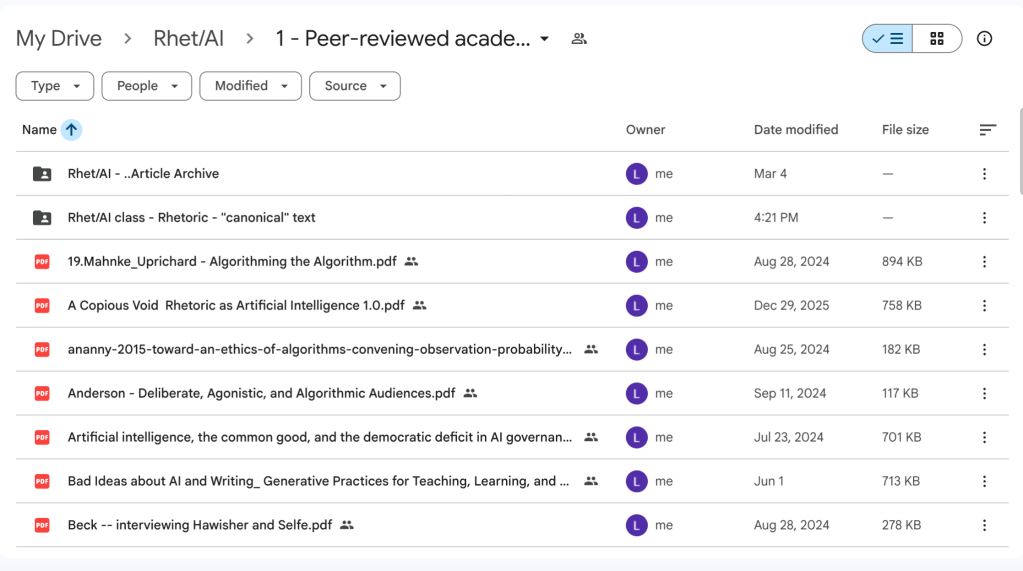
Figure 8: 8 October 2026.
Of course, when I was teaching a class in which I had full control over assigned readings (I really didn’t know how good I had it!), I always organized Folders on Canvas by week in order to make it easy for students to find assigned material. Looking at my current interface, in addition to renaming files, I can see that I need to begin with organizing by discipline. I could always take a hint from my own Academic Archive, especially if I enable Open Access soon.
2. News and Commentary on AI
I have already discussed this section. Outside of using the folder as a corpus analysis guinea pig, I ought to further distinguish between types of news, opinion, and trade sources, particularly if I recreate past lectures on Bias, Credibility, and Fact-Checking different genres of nonfiction writing. It is funny to think that at least 6 years after my Flash Fellowship project documented in this post that I am once again evaluating news sources in corpus analysis.
If you want a visualization, the following video provides a tour and overview of an 8 Oct 2026 version of my AI Verb Exploration webpage. The audio is AI-generated. I warn that the volume is quite loud and recommend watching silently with subtitles if you chose. You do not need to watch this video to understand this post.
Video 2:
3. Primary Source Documents
To be decided. These documents are essentially impossible to strategically determine their assignment value without a clear idea of the level of course that this (hypothetical) class might take.
4. Educational Material
Finally, I have used the “Educational Material” as a “catch-all” of resources I have assigned and created for past and current teaching/mentoring (including both resources for students and templates for myself to write syllabi, rubrics, and assignments), resources created by other people, and even a “brainstorming” folder for lesson plans and in-class activity ideas.
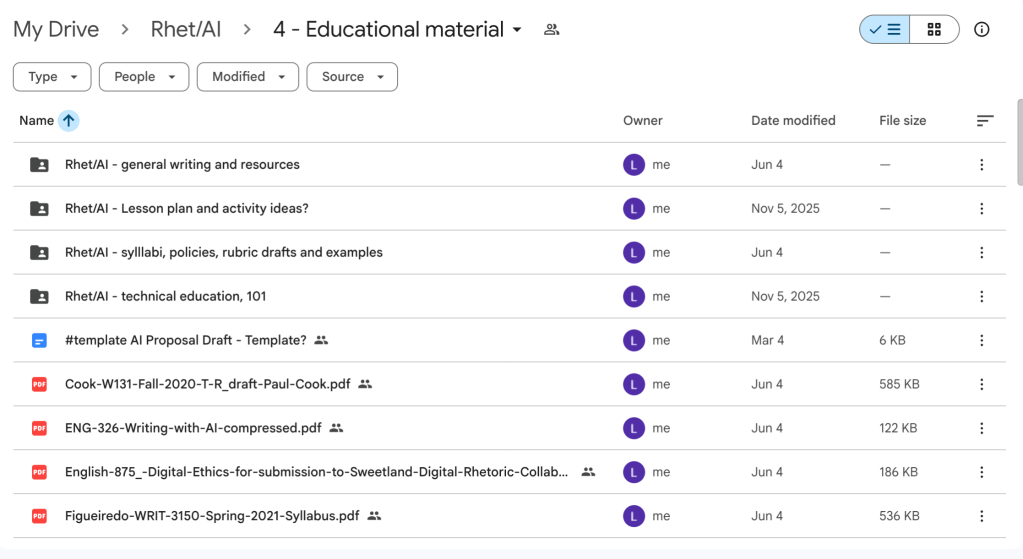
Figure 9:
At this point, I do feel as if I have backed up my past Educational Material for my lower-division undergraduate courses, so I am not worried about losing this material – which has not been the case with everything I created at my old alma mater – and I am certainly not concerned about adapting it should I get to teach what I know would be a potentially…controversial…course at universities these days. This folder is the “second priority” within the larger “Rhetoric of AI” folder reorganization project after “Peer-Reviewed Academic.” And given that, honestly, “Rhet of AI” is low on my organizational list, I probably will not get around to substantially adapting my teaching material to this new class outside of my ongoing teaching portfolio and curriculum design portfolio.
The final folder, “Other,” was included in my prompt chain to give Claude a place to put files that it could not categorize. Because AI tends to “make things up” to provide an answer or produce some document, even a very wrong one, giving the AI tool “room” to not know what to do with an input actually helped me. Once the data that AI couldn’t categorize was mostly in one folder, I could move those files manually more easily than going through each of the other folders individually (though of course, I did so anyway).
Conclusions:
This post is not an essay arguing for a specific point, but a short reflection on how I have begun to use Claude Opus’ project features to gather data for my research and to present it online in an easy-to-use, accessible format. The fact that Claude’s obvious limitations in academic research are highlighted in this “experiment” is itself valuable knowledge. Because I use the tool to extract research that I am experienced in analyzing, and because I do not take Claude’s extraction of quantifiable data at face-value and definitely never rely on its qualitative explanations for relevance, I can see ways going forward to use the tool effectively to accomplish the same tasks that I worked on in graduate school at the Digital Writing and Research Lab at UT Austin more speedily.
Concerns regarding privacy, ethical AI use, and Anthropic’s horrific implementation in higher ed is the subject of a different post.


Leave a Reply