
Reprint from DWRL Lesson Plan – 2018.
In today’s information economy, the abundance and production pace of information can make it difficult to follow news coverage of any given topic or event. Whether you are comparing different coverage of the same topic by more than one news source, tracking coverage of a topic in a single source over a period of time, or following a single news source in order to track popularity of topics, data visualization can help identify and neatly summarize trends and patterns, or textual data, in service of an argument that draws from this data. However, as discussed in previous data visualization work by the Digital Writing and Research Lab, data visualization can be unintentionally misleading or unnecessary. Deciding what information should be summarized by visualization and selecting the appropriate format is part of selecting “the most appropriate mode of persuasion,” to paraphrase Aristotle, for a rhetorical situation.
Learning Objectives
This lesson plan has three practical objectives:
- To demonstrate how to use metadata to filter and organize information in large databases (in Overviewdocs) before visualization.
- To export information from Overviewdocs as a Comma Separated Value excel spreadsheet file (CSV).
- To show how to create visualizations of chronological trends in RawGraphs.io.


- Assignment Length
- Reserve one class session for the in-class activity. The compilation of the document set can be done over the course of a week for a low stakes, collaborative assignment or may be expanded to a semester-long project at the instructor’s discretion.
- Connector.
- Required Materials
- Access to an individual computer and internet
- An individual account in Overviewdocs for each participant. No RawGraphs account required.
- A document set of newspaper articles. If the in-class activity is conducted in preparation for a larger research project, students may practice using pre-existing newspaper databases such as those linked in the Assignment Description Section. The Washington Post Archive (1877-1997) by The New York Public Library, The U.S. National Archives, The District of Columbia Public LIbrary archives, or another archive of choice located through ProQuest.
- Google Chrome is the recommended browser for Overviewdocs.
- Skills Necessary
- Instructors are encouraged to familiarize themselves with the software before the class session. Students may need to briefly familiarize themselves with downloading online newspaper articles as PDFs or Word format to store on Overviewdocs. No prior experience with data visualization, CSV files, or design necessary.
Access and Adaptability
If the class includes students with hearing or seeing disabilities, instructors are encouraged to structure the assignment as a group project so as to partner disabled students with others in order to distribute the work according to ability. Resources for students with color blindness can be found here.
Assignment Description
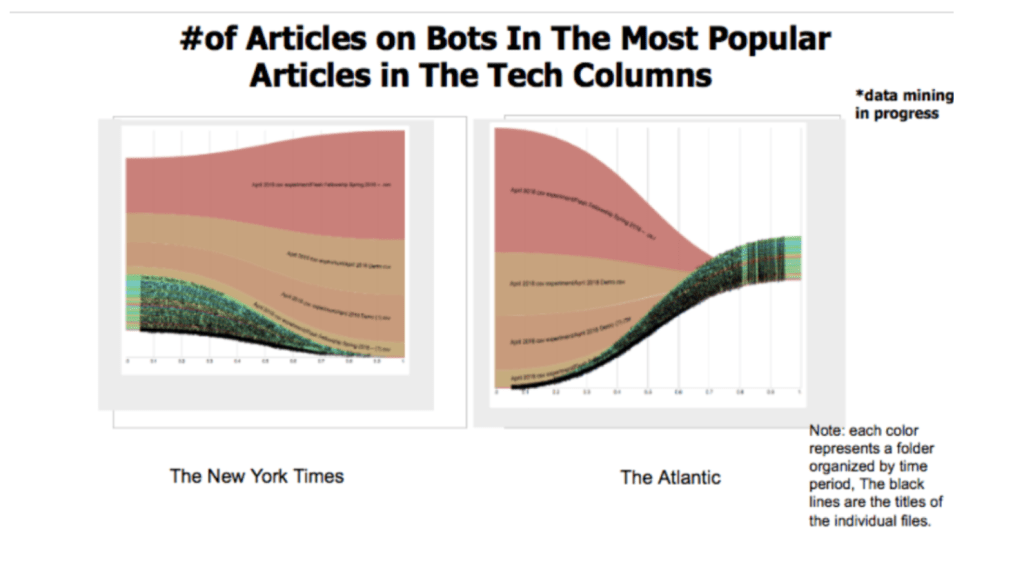
This lesson plan provides an exercise in tracing patterns across large bodies of text across a period of time through an in-class activity on visualization with the simple open-source tool RawGraphs.io. The Skills Workshop demonstrates how to export and visualize data in two steps. First, the students will learn how to filter through large data sets (document sets) on the text-mining software Overviewdocs by term, topic (“entity”), folder, or manually input metadata (“tag”). The workshop then demonstrates how to download necessary data in Comma Separated Value (CSV) Excel spreadsheet files (CSV). Second, the workshop guides students through uploading their CSV files to RawGraphs. It shows how to visualize simple timelines (x-axis for time, y-axis for quantity (word count, popularity). It also covers slightly more complex visualizations, as presented in the Skills Workshop video. The remainder of the class period should provide time for students to experiment with their visualizations. Expect students to try numerous graphs and possibly return to Overviewdocs many times to re-tag or re-organize information as necessary. The purpose of the activity is not to create a perfect visualization by the end of the class period, but to begin practicing with visualizing text linearly.
Objectives:
This lesson plan provides an in-class activity on visualizing publication patterns on a timeline using the simple open source tool RawGraphs.io. Before beginning, if the students do not already have an Overviewdocs account and a pre-existing database, they should sign up and transfer their own database or files downloaded from one of the archives linked in the introduction to Overviewdocs, following the Skills Workshop video if necessary.
The in-class activity has two main sections: exporting data and visualizing data.
The first part of the activity guides the class through exporting data from one platform to another. It demonstrates how to upload or export information from a set on the text-mining software platform Overviewdocs. The video shows several ways to search through a database of text files (document sets) to isolate necessary information: searching by keyword or topic (entity), downloading by folder, or using manually input metadata (“tags”) to categorize a document. In class, students will use these search methods to filter a dataset for the information most relevant to their individual projects. Then, they will download textual data as a Comma Separated Value (CSV) spreadsheet.
The second section of the in-class activity covers using RawGraphs to visualize textual patterns. After uploading their CSV spreadsheets to RawGraphs, use the templates provided by the website to experiment with creating graphs. The rest of the class period should be devoted to sandboxing their projects.
This activity may be useful to students already engaged in a research project who have already built up a pre-existing database. In this case, students are encouraged to work collaboratively to upload news articles into a single document set on Overviewdocs for the purpose the in-class activity. See Sharing Sets.This activity may also be useful as a pre-liminary step in a larger research project to introduce concepts of data organization before beginning research. In this case, students may practice using pre-existing newspaper databases such as The Washington Post Archive (1877-1997) by The New York Public Library, The U.S. National Archives, The District of Columbia Public LIbrary archives, or another archive of choice located through ProQuest.
It is recommended that a newspaper “source” be restricted to a specific keyword or column rather than an entire paper. For example, the “The New York Times technology column” or “The New York Times articles with the keyword “Uber’” are more manageable than “The New York Times.”
Instructor Preparation
- Instructors are encouraged to familiarize themselves with the software using the Skills Workshop video below prior to the lesson.
- Ensure that everyone has access to an Overview docs database prior to the in-class activity.
Allow the students enough time to think about what information they may want to visualize. Allow as much time as necessary depending on the grade percentage of the assignment unless used as a participation grade.
Student Preparation
- Set up an account on Overviewdocs.
- Ensure access to a database prior to the in-class activity. Students may use one of the pre-existing sets linked above if needed.
- Preferably come prepared with an idea of a visualization project with the understanding that their topic may narrow or change.
- Ensure access to an individual computer and internet access on the day of the in-class activity. .
In-Class or Assignment Instructions
- This activity requires that students acquire or assemble a collection of PDF or Word Document versions of online or digitized news articles either prior to the class session or, if using pre-existing sets linked above, in the first few minutes of the activity.
on the text-mining platform Overviewdocs.
- This activity requires that students acquire or assemble a collection of PDF or Word Document versions of online or digitized news articles either prior to the class session or, if using pre-existing sets linked above, in the first few minutes of the activity.
- First, we are going to download (export) data from a pre-existing data set (document set) on Overviewdocs. The Skills Workshop shows three different ways to filter information: searching by keyword or topic (entities), searching by organization tag, or downloading by folder.
- Second, the workshop walks through visualizing timelines and patterns on RawGraphs. It shows two different ways to download a set as a CSV files — how to download all tags in one file and how to download each tag in a different file. Then, it will show how these two file formats work in RawGraphs. The lesson video concludes by covering a few data visualization tips for customizing visualizations and data organization for specific projects.
- The lesson video concludes by covering a few data visualization tips for customizing visualizations and data organization for specific projects. The Skills Workshop demonstrates a few do’s and don’ts in visualization and offers suggestions on how to tag data files prior to downloading them as CSVs.
- After walking through the assignment with the Skills Workshop video, students should spend the rest of the time practicing for their own projects. With ten to fifteen minutes left in the class session, reconvene the class for an oral discussion of what the uses and limitations of the visualization experiments.
- The remainder of the class period should be reserved for allowing students time to experiment with the software. The instructor may reserve the entire period for sandboxing or reconvene the class in the last ten to fifteen minutes for a brief oral discussion, depending on how quickly the students master the exercise.
Skills Workshop
Video tutorial here.
(Note from 10/29/2024: video was inserted into original).
Assessment Suggestions
In a course that requires producing audio texts, it is recommended that the instructor require a transcript of all audio writing produced by the students in the final project.
- Suggestions for Portfolio-Style Assessment
- Suggestions for Traditional Assessment
Traditional Assessment: This assignment can be incorporated into the overall participation grade. If the in-class activity is structured as a group assignment, the instructor can also assign a follow-up in-class presentation.In a Portfolio——style assessment – This assignment can be developed into a student portfolio in two different ways. One option is incorporating the visualization into a “final project.” Another option is to require a short reflection essay on the in-class assignment.
 Post-Machina
Leave a comment